September activity report
Hello again! The August report ended in mid-September, with the Dell humming along, Firefox on YouTube running where it had no business running. This report picks up there and runs to the end of the month.
In short: a new laptop joined the family and went from "black screen, frozen forever" to "desktop running on the graphics chip, over WiFi, next to macOS" in about four days. Somewhere along the way we taught the desktop to mix sound, to understand trackpad gestures and to show notifications, and we shipped a new release you can install from the website.
Grab a coffee, this one is long.
Meet the new roommate: a 12-inch MacBook
The newest machine in the lab is a 12" MacBook from 2017. It's thin, light and adorable, and it was clearly designed by people who believe one USB-C port is enough for anybody.
That one port became the running joke of the month. It can charge the laptop, or it can connect a USB stick, or a network adapter. Pick one. More than once, a debugging session got the dreaded message: "battery is running low, I need to leave it charging". So the laptop charged, the network went away, and we stared at the ceiling until it came back.
Day one: time stands still (literally)
The first boot got a few lines in, then... nothing. No crash and no error. The system simply stopped.
The culprit was the clock. Every PC has had a little timer chip since the 1980s, and pretty much every operating system uses it to count time while booting. This MacBook's firmware quietly switches that chip off. It's still there, it answers when you talk to it, and then it never ticks. So the first time AnotherOS said "wait one second", it waited for the rest of eternity.
The first fix was a lifeline: if the old timer goes silent, a newer timer inside the processor takes over. The real fix came a day later. AnotherOS now keeps time the way modern systems do, using the processor's own high-precision clock, and it no longer relies on the old chip at all. That goes for every machine, not just the Mac.
The same boot showed a second, sillier problem: the text console scrolled at a quarter of a second per line. A 1950s teletype would have kept up. The screen memory was being written without any caching. We set it up properly and the console went from typewriter to firehose.
A desktop, the same evening
Once time was flowing again, things moved fast. On the evening of the first boot the MacBook was showing the full Fasadas desktop: dock, menu bar, the lot. That's the moment we said: "it's booted!!!!"
Living together: dual boot with macOS
A laptop that only boots from a USB stick is a demo, not a computer. The next job was installing AnotherOS on the MacBook's internal SSD, next to macOS, without upsetting macOS at all.
It now works exactly as you'd hope. Hold Option at power-on and the Mac offers both systems. Pick AnotherOS and you get AnotherOS. Pick macOS and you get a Mac that has no idea anything happened. (A Time Machine backup was made before we started, because we're brave, not reckless.)
It wasn't a straight road:
- The first install "worked" and then forgot everything on the next reboot. The disk driver was writing into the SSD's fast cache and never telling the drive to put the data somewhere permanent. The SSD said "sure, got it" and then, at power-off, it didn't. Now we ask the drive to commit at every point where it matters, and the installer checks its work by reading back from the disk itself, not from memory, which would agree with anything.
- The disk driver had been giving the SSD 6 milliseconds to answer before panicking. Real SSDs sometimes need a few seconds, so it now waits a sensible amount of time, and if the drive really does get stuck, it's reset and asked again instead of freezing forever.
- Apple's SSD uses big 4 KB sectors, and our partitioning tool had only ever met the classic small ones. Now it has met both.
The best bit: the graphical installer can now do this too. It offers to install alongside macOS or Windows, using free space or partitions you've prepared, and explains what to do if there's no room. No terminal needed.
Retina, and all the little buttons
The MacBook's screen is 2880×1800, which is gorgeous and also tiny if you draw everything pixel for pixel. The desktop now understands HiDPI: on the MacBook it behaves like a comfortable 1440×900 screen and draws everything at double sharpness. Text is crisp, icons are crisp, and ordinary screens look exactly as before.
Then came the keys everyone takes for granted:
- Screen brightness (F1/F2) works.
- Keyboard backlight (F5/F6) works, so typing in the dark is back.
- Volume (F10/F11/F12) works.
- Caps Lock's little green light works. It sounds trivial. It needed a test where we watched the key while toggled it remotely.
- Each of those keys now shows a macOS-style on-screen bezel, the rounded box with the sun, keyboard or speaker icon and a level bar, which fades in and out like you'd expect.
- The microphone works too. It had been hiding because we were reading the audio chip's wiring diagram in the wrong units.
The WiFi saga (or: nineteen theories and one very embarrassing bug)
This was the boss fight of the month, and it deserves its own chapter.
The MacBook's WiFi chip could scan perfectly: every network in range showed up in the list. But the moment you clicked one to join, the chip's own software died on the spot, roughly ten milliseconds after we sent it the first packet. Its memory read back as garbage, and the chip was simply gone.
So we did what engineers do. We made a theory, wrote down what should happen if it was right, built a kernel to test it, and booted the MacBook. Then we did it again. And again. Was it the order of the security handshake? Power saving? Some power-management mode? Packet alignment? (That one got three separate tries.) Transfer sizes? Where our memory sat in the chip's view of the world?
Every theory was wrong, and we wrote each miss down honestly. The breakthrough came from swallowing our pride. We booted Ubuntu on the same MacBook, with the same chip and the very same firmware file we use. Ubuntu joined the network first time. That settled one thing: the bug was ours, and there was no point blaming Broadcom or Apple any more.
So we recorded every single write Ubuntu's driver made to the chip, recorded every write ours made, and compared them line by line like a pair of spot-the-difference puzzles. And there it was.
During setup, our driver was writing a zero into the very first word of the chip's memory. That word is where the chip's processor jumps when it restarts. We were quietly erasing the chip's "go here if anything happens" instruction, twice, while it was busy. The chip ran along fine until joining a network nudged it to that spot, and then it jumped into nothing.
It was a one-line ordering mistake that took most of a week to find. The fix is small, and the driver now refuses to touch that part of the chip's memory at all once the chip is running. The next kernel joined the network, got an address, and stayed on. It reconnected, disconnected and joined again, four times in a row.
Once WiFi worked, we could finally see how the rest of the networking behaved on a real wireless link, and it needed some love:
- Downloads survive a dropped packet. WiFi loses the odd packet. Our network code used to react to one lost packet by throwing away everything that arrived after it. Now it keeps the good packets and only asks for the missing one, like every grown-up TCP stack does. On WiFi that's the difference between a download finishing and not finishing.
- Remote logins stopped freezing. A small plumbing bug meant a program waiting to send more data sometimes never got woken up, so SSH sessions would just sit there.
- Your network address renews itself properly before the lease runs out, like a library book you actually return on time.
- DNS follows your network. The DNS server setting used to be written in once and never changed. Now it's updated every time you connect, whether over WiFi or cable.
- The network tools show every adapter under its own name, which helps a lot when a USB-C network adapter comes and goes.
The older 2011 MacBook Pro got WiFi news too. Its chip turned out to belong to a family that the Linux driver we'd ported had never supported. It now connects, with proper 802.11n speeds, and the WiFi menu shows extra detail such as channel, noise, transmit rate and PHY mode when you hold Option, just like on a Mac.
The graphics chip finally gets a job
Until now, the MacBook's Intel graphics chip was mostly a very expensive way to light up the screen, while the processor did all the drawing. September changed that.
AnotherOS now has a proper driver for this generation of Intel graphics. It gives each app its own slice of graphics memory, runs work on the chip's drawing, copying and video engines, and recovers if the chip hangs instead of taking the whole system down with it. It's switched on automatically for this family of chips, and older machines such as the Dell keep exactly the driver that already worked for them.
Here's what we measured on the MacBook:
- Real 3D. The modern Intel OpenGL driver renders on the actual hardware. No software rendering pretending to be a GPU.
- Our speed test, AGreitis, went from about 46 frames per second to about 68 when it draws through the GPU instead of the processor.
- Video decoding on the GPU. Every test clip decoded correctly on the graphics chip, so the processor gets a break and the battery lasts longer.
- Firefox uses the GPU for drawing web pages. Everyday browsing is hardware accelerated. Pages that hammer WebGL non-stop can still trip it up, and that's on the list.
- The desktop itself can be drawn by the GPU. It's switched off by default for now, while we remove one last slow step, but it's already pixel-for-pixel faithful to the normal desktop.
There was one exciting evening. During the graphics tests, a second program grabbed the screen at the same time as the desktop and stole it. The MacBook sat there with a frozen picture, very politely ignoring everyone, until somebody walked over and held the power button. That can't happen any more: the screen has exactly one owner.
We also chased a mystery where one small window, "About this PC", came out one shade of grey different on the GPU than on the processor. Nobody could see it by eye. The test could, and it was right. Now they match.
Meanwhile, on the desktop
Before the MacBook took over the month, the first half of September went into making the desktop nicer to live in.
Sound that plays well with others
Remember Firefox "sometimes crackling"? Here's the story. The sound card can only play in one format at a time. When a second app opened it, say a music player or the desktop's own startup chime, it simply changed the format underneath whoever was already playing. Your nice 44 kHz stereo music was suddenly read as 8-bit mono, which sounds about as good as it reads.
Now the system mixes. Every app gets its own stream, each one is converted to what the card is running at, and they're added together. Firefox, a music player and a notification chime can all play at once, and none of those apps needed changing. There's also a volume slider per application now, so a loud browser tab can be told to calm down.
Rastinis grows up
The file manager learned the everyday things:
- Copy, move and Trash, and a trashed file remembers where it came from, so it can go back there.
- Empty Trash from the Plintusas, with a proper "are you sure?", and a Trash icon that looks full when it's full.
- A system-wide clipboard that understands what you copied: text, images or files.
- Connect to Server for network shares, which no longer freezes the window while it connects.
- Akis, a quick-look previewer: select a file, see what's inside.
We also fixed a crash when you dropped a file in a certain way. The app needed more than its whole stack for a single step, like trying to pour a bucket into a mug.
Notifications and a Notification Centre
Apps can now post notifications: banners, alerts, even buttons you can click. Click the clock and a Notification Centre slides in with your recent notifications and a weather tile.
The weather tile gave us a lovely midnight bug. After 00:00 it proudly labelled yesterday as "Today" and showed its forecast. A time machine that only goes back, and only as far as last night. Fixed.
Mission Control, App Exposé and Spaces
This is the one that made the desktop feel grown up. Swipe up with three or four fingers and every open window glides out into a tidy overview: that's Mission Control. Along the top sits a bar of Spaces, extra desktops you can add, remove and switch between, and each window remembers which one it lives on. Swipe sideways and the whole desktop slides to the next Space, following your fingers the whole way, with a little rubber-band stretch when you hit the last one.
App Exposé fans out just the windows of the app you're using. Show Desktop pushes every window to the edges of the screen so you can grab that file you saved on the desktop. And Launchpad opens with a pinch.
Nothing here is a canned animation that plays once you've committed. The motion tracks your fingers, and if you change your mind halfway and lift, it settles back. The macOS keyboard shortcuts and hot corners work too.
The rest of the trackpad got love as well:
- Right-click with two fingers, by clicking or tapping, just like on a Mac.
- Three-finger drag to move windows without holding the button down.
- Smooth scrolling with momentum in Finder, the terminal, Launchpad and Qt apps. Apps can now receive gestures themselves, and swipe back and forward work in Qt apps.
Desktop Effects: wobbly windows and the genie
System Preferences has a new Desktop Effects pane, and yes, it has wobbly windows. Not a fake squash either: every window is a little grid of masses and springs. Grab one by its title bar and fling it, and the body lags behind your pointer, the edges bow, and when you let go it wobbles and settles like a jelly on a plate. Sliders set the springiness, the friction and how far it's allowed to wobble.
The genie effect, where a minimised window gets sucked into the Dock like smoke into a lamp, got a proper fix. For a while the genie forgot the window's title bar, so windows went into the Dock headless and got their heads back only at the very last frame. Slightly spooky. Now the whole window makes the trip.
Our favourite detail: the pane shows the desktop's live frame cost, and two of its switches, menu bar translucency and window shadows, can make the desktop faster on slower machines. It's an effects pane that can give you speed back, not just take it. There's also an "Instant" setting that skips animations completely, for when you just want things to happen.
A new screen saver: walk the maze
The new default screen saver is Labirintas, a first-person walk through a textured sci-fi maze that ends at the AnotherOS emblem. The owner's review after seeing it on the MacBook, in full: "screensaver is perfect!". We've framed that one.
Stickies, menus and other small joys
- Stickies is back from the classic Mac days: little coloured notes on your desktop that are saved and come back when you log in. Apps can now be set to start at login, too.
- Menus grew up. They have real soft drop shadows, you can drive them entirely from the keyboard (arrows, Return, Escape), menus too tall for the screen scroll, and every text field has proper Cut, Copy and Paste in an Edit menu. Right-click context menus are everywhere, including on desktop icons.
- Rastinis shows folder sizes and icon previews, hidden files toggle with Shift-Cmd-period like on a Mac, and Space opens and closes the quick-look preview.
- Own startup and shutdown sounds. The desktop now plays the project's real startup and shutdown sounds, and it remembers your volume between boots instead of forgetting it every time.
- The boot splash appears instantly. On the MacBook it used to show up about 9 seconds late, after a screen of scrolling text.
- A maximised window now actually reaches the Dock, and the mouse pointer no longer jumps a line down when it changes shape. Tiny things you'd never notice, until they're fixed.
A snappier desktop
A few speed stories we're proud of:
- The desktop got slower the longer it ran. After a day it could be 5–10 times slower than after a fresh boot. The culprit was the screen saver, which leaked a tiny bit of font information on every frame, and every one of those leftovers made the whole system a little slower. The leak is gone, and so is the slowdown.
- The frosted-glass menu bar was eating 65% of every frame. The cause was one single division inside the blur, in the wrong place. One line moved, and the menu bar is cheap again.
- The screen saver ran at 4.7 frames per second because the desktop forgot to wake up for it. Now it runs as smoothly as it was meant to.
- The battery indicator used to say "Charging" with the charger unplugged. It now tells the truth, and holding Option shows voltage and temperature.
A bug we're glad is gone
For a while, keys typed into a desktop window were also being typed into a hidden text console behind the desktop. That console was logged in as the administrator. Nobody noticed any harm, and we'd rather not think about what "rm" in a text editor might have done. Each key now goes to exactly one place.
Windows apps, and friends
The Windows compatibility layer, which runs real .exe programs directly
on the AnotherOS desktop, had another big month:
- A suite of Windows apps now installs into Applications like any native app, with its own icon, and starts with a double-click.
- Windows programs can reach the internet through the Windows web APIs, over proper encrypted connections.
- The real Windows Color, Font and Find/Replace dialogs are here.
- Right-to-left and complex scripts (Arabic, Hebrew and friends) are shaped and ordered correctly.
- Windows programs can play sound through all the usual Windows audio APIs (the old ones, DirectSound, WASAPI and XAudio2), mixed with everyone else, of course.
- Games! DirectDraw, DirectInput, and OpenGL and Direct3D (versions 8 to 11) now draw on the real graphics chip. The headline: the StarCraft shareware demo is playable on the Dell, full screen, at 256 glorious colours, and it survived a 20-minute play session without a hiccup. Zerg rush on a homemade operating system, anyone?
- Serial ports for Windows apps, so old Windows tools that talk to COM ports can talk to real USB serial adapters.
- First native 64-bit Windows programs. The loader can now start
modern 64-bit
.exefiles, with the Windows-style crash handling they expect. Simple programs first, the big ones later.
On the native side:
- Five new Go + Qt applications build, install from the repository and run on the desktop.
- Qt 6 runs natively on our desktop on real hardware.
- Work on Telegram moved forward. Its mysterious crash on startup turned out to be a missing locking feature in our kernel. When the kernel said "I don't know how to do that", Telegram's reaction was to deliberately crash, which is one way to make a point.
- A Chromium port has begun. It already identifies itself honestly as AnotherOS rather than pretending to be Linux, and it builds its first test shell. Early days, but the engine is turning over.
Under the hood (the short version)
A few kernel changes that make daily life better:
- The power button works. A short press shuts down cleanly, and the next press still turns the machine on.
- USB serial adapters work: the popular FTDI, CH341 and CP210x chips, plus standard USB modems. Arduino people, this one's for you.
- A scary disk bug was found and fixed: deleting a certain kind of tiny shortcut file could free disk space that was still in use by something else. It was rare, but serious enough that it jumped the queue.
- Reading files got faster: every read over 1 KB had been doing a pointless hunt through memory first.
- Apple's firmware and our kernel now get along when saving settings, where before the Mac simply said no.
- A real ACPI brain. ACPI is the firmware language a laptop uses to describe its lid, battery, charger and buttons. AnotherOS now uses the same industry-standard interpreter as the big operating systems, so laptops report their lid, battery and charger properly.
- USB network adapters, including Realtek's popular 1, 2.5 and 5 gigabit USB Ethernet dongles, and USB devices plugged in through hubs.
pingworks for normal users, not just the administrator.
Updates, the safe way
AnotherOS now has a proper Software Update service. It checks the signed package repository in the background (or never, if you turn it off, in which case it doesn't contact anything at all), and it offers new versions of the core system and the kernel. The Software Update pane also stopped doing one alarming thing: it used to install everything the moment you opened it.
The clever bit is how new kernels are installed. On PCs whose firmware allows it, a new kernel is tried exactly once. If it boots fine, it's promoted to be the default. If it doesn't, the next power-on simply goes back to the kernel that worked. A bad update costs you one reboot, not an evening with a USB stick.
The new release
At the end of the month everything above came together in a new release of the kernel and the core system. It's built, signed and published to the package repository, and it was installed on the lab machines the same way you'd install it: from the repository, not by hand.
If you're already running AnotherOS, a normal update brings you most of it. The newest graphics work, the GPU driver and the GPU-drawn desktop, landed in the very last days of the month and rides along with the next update.
Try it yourself: the September preview image
Here's something new: alongside this report we're publishing a downloadable live image that anyone can try. It's AnotherOS 0.9.0, kernel build k2225, userspace build u1559, and it has everything in this report, including the fresh graphics work.
- Try it in a virtual machine (QEMU): the safest way to have a look, because nothing on your computer is touched.
- Or flash it to a USB stick and boot a real computer from it. The live system runs from memory and leaves your disks alone unless you run the installer.
- The download page has step-by-step instructions for Windows, macOS and Linux, the checksum, and an explanation of what those "k" and "u" build numbers mean.
👉 AnotherOS 0.9.0 (k2225 / u1559): download and release notes
A friendly but serious warning: this is early alpha software. It's unstable, it isn't meant for everyday use, and it can crash, lose data or misbehave on hardware we've never met. Use it at your own risk, back up anything you care about, and if in doubt, stick to the virtual machine. It's a preview of where we're going, not a place to live yet.
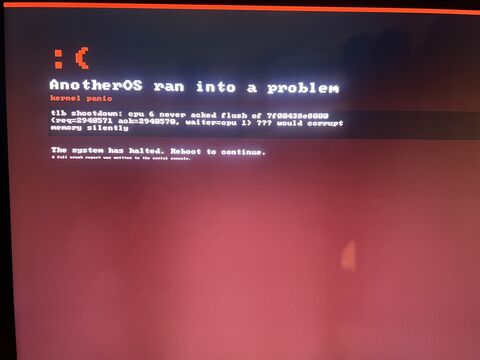
And if it boots on something unexpected, like a laptop from the back of a drawer or a mini PC nobody's heard of, we'd love to hear about it. Send a photo of the screen and the two build numbers.
Behind the scenes
A word on how this is made, since people keep asking. The development is done together with an AI, which writes and tests code around the clock, until the weekly usage limit runs out. This month it ran out uncomfortably close to the finish line: the last few days were spent racing the meter, with messages like "hurry up, we're at 95% of the weekly limit". We made it. Just.
The lab is real hardware, not simulations: a Dell that gets switched on by a little robot finger pressing its power button, a camera watching its screen, a gadget that types on its keyboard, and now a MacBook that occasionally needs a human to go and hold its power button.
What's next
Short term: finishing what we started
- The whole desktop drawn by the GPU, switched on by default once the last slow step is gone. Smoother animations, cooler laptop.
- Firefox and WebGL-heavy pages on the new graphics driver.
- More MacBook polish. Everything except Bluetooth and the webcam already works. Those two are on the "someday" shelf.
- Chromium: from its first test shell to a real browser.
- Even more rock-solid disks: keeping the system snappy when a disk is slow or misbehaving.
The big idea: a second life for old Intel Macs
Here's a plan we're seriously considering, and we're a bit in love with it.
There are a lot of perfectly good Intel Macs in drawers and on shelves. The build quality is lovely, the screens are gorgeous, the keyboards light up, and Apple has stopped supporting them with new versions of macOS. The 2011 MacBook Pro in our lab stopped getting new macOS versions years ago. Even the 12" MacBook from this report can't go past macOS Ventura. For many of these machines, the choice today is "keep running an outdated system" or "send it to the recycling bin".
So the idea is to focus AnotherOS on Intel Mac models that Apple has dropped, and make it a proper replacement system for them: a modern, maintained OS that feels at home on a Mac, with a Mac-like desktop, the Option-key boot picker, Retina screens, the brightness and keyboard-light keys, trackpad gestures and all.
Not a bad plan, huh? Supporting a known, limited family of machines properly beats supporting every PC under the sun badly. And this month's MacBook work shows it can be done: from a black screen to a GPU-drawn desktop over WiFi, next to macOS, in four days.
The longer road: apps, apps, apps
An operating system is only as good as what you can do with it. On the list:
- Office and productivity. LibreOffice first, plus the everyday tools people expect to find on a real computer.
- 64-bit Windows apps. The Windows layer already runs plenty of 32-bit programs. Next is making it run the big modern 64-bit ones, like Microsoft Teams, Slack and Microsoft Office. Ambitious? Very. Fun? Also very.
- Developer tools. Getting IDEs like Visual Studio Code running, and the Arduino tools. We already have the USB serial drivers that boards like Arduino plug into. What's missing is porting the cross-platform toolchains that build code for those microcontroller chips. Then you could flash an Arduino straight from AnotherOS.
And the bug pile
Let's be honest: our issue tracker holds about 530 open issues, and about 770 are already closed. Every one of them is a real bug, a missing feature or a rough edge someone wrote down so it wouldn't be forgotten. Working through that pile is as important as any shiny new feature, and it's what turns "a preview" into "a system you'd actually use".
A short break
One more announcement: the project is taking October off. After a month like this one, the humans need a holiday too. Work continues in November or December, with fresh eyes, a recharged weekly limit and, hopefully, a recharged human.
In the meantime the preview image is out there. Try it, break it, and tell us what happened.
That's September. The MacBook is charging, the Dell is humming, and the little robot finger is resting. See you after the break!